A second Bin for your Dock
Your files deserve a more dramatic exit.
Spellbin puts a pixel-art cauldron in your Mac's Dock. Drop a file in and a green flame carries it off. Every drop counts towards new cauldrons.
macOS 14+. Coming soon.
Demo of the three ways to feed Spellbin. A photo is dragged from the Desktop onto the cauldron in the Dock and burns with its picture in a green flame, and a notification says “Achievement: First Offering: Everyone starts somewhere. Usually with a screenshot.”. Then a PDF in a Finder window is right-clicked and Feed to Spellbin is chosen. Last, three files are selected in Finder and Command-Delete is pressed; each burns in turn.

Features
Small, silly, and properly made
A native Mac app that does one thing with unnecessary flair, then keeps score.
- 01
Drop it on the Dock
Drag files or folders onto the cauldron. Works the moment it is installed, with no permissions at all.
- 02
⌘⌫ in Finder
The shortcut you already use, rerouted to the pot. Or right-click and pick Feed to Spellbin.
- 03
Flames above the Dock
The flame climbs out of the icon and over your windows instead of staying politely inside its tile.
- 04
Thumbnails on the flame
A Quick Look preview rides each flame, so you can wave that blurry screenshot off by name.
- 05
A proper sizzle
A synthesised hiss on every drop. One toggle for when you are in a library.
- 06
Stats
Items binned, bytes freed, the recent list and your streak. Mostly for bragging.
- 07
Achievements
Milestones for items, gigabytes, folders, streaks and file types. Some are secret. Unlocks arrive as macOS notifications.
- 08
15 cauldron skins
Iron to start. Copper, Bone, Starlight and the rest are earned, not bought.
- 09
No network, no accounts
Spellbin makes no network calls. No analytics, no sign-up, nothing to log in to.
- 10
Permissions, explained
First-run setup says why it wants each permission before macOS asks. Every step can be skipped.


How it works
Three ways to feed it.
Use whichever one your hands already know.
- Way 1

Drop it on the Dock
Drag files or folders onto the cauldron. Works the moment it is installed, no permissions at all.
- Way 2Downloads
 Invoice.pdf
 notes.txt
- Sunset.jpg
Right-click, Feed to Spellbin
It sits right in Finder's right-click menu. Also needs no permissions.
- Way 3Downloads
 Screenshot.png
 Old Stuff
 Clip.mov
 Keep me.zip
⌘⌫Select, then ⌘⌫
Pick as many files as you like and press the shortcut you already use. Needs Accessibility and Finder access, asked once.
Skins
Fifteen cauldrons. You start with one.
Each skin is earned by an achievement. Swap between any you have unlocked from the Spellbin window. Here are five of them. The rest you will have to find.
- IronStarter
- Copper10 items
- Cobalt100 items
- Lava1,000 items
- Starlight???
Achievements
Cookie Clicker, but the cookie is your Downloads folder
Items, gigabytes, folders, dissolves, streaks and file-type variety all count. The secret ones stay hidden until you earn them.
First Offering
Everyone starts somewhere. Usually with a screenshot.
1 itemA Gigabyte Gone
A whole gigabyte, dissolved into green.
1 GB freedUnlocks Witchfire skinDaily Ritual
Seven days in a row. It is a habit now.
7-day streakUnlocks Verdigris skin
Plenty more where those came from, and a few nobody will tell you about.
Permissions
What it asks for, and why
Spellbin explains each permission before macOS asks, and you can skip any of them. These are the screens it shows you.

Nothing at all
Dropping files on the Dock icon
Install, drop, done. Everything else is optional.
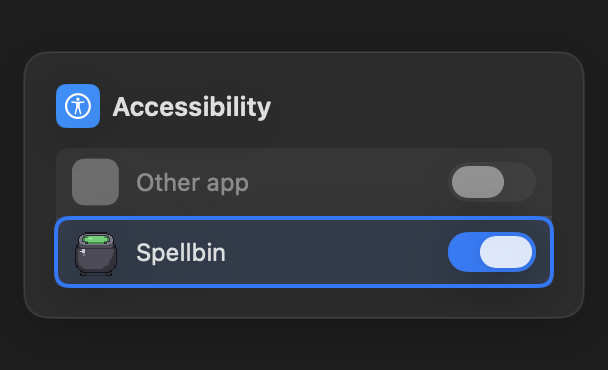
Accessibility
Flames above the Dock, and catching ⌘⌫
Used to find Spellbin's own Dock tile so the flame can rise over it, and to notice ⌘⌫ while Finder is in front. It never reads what you type.
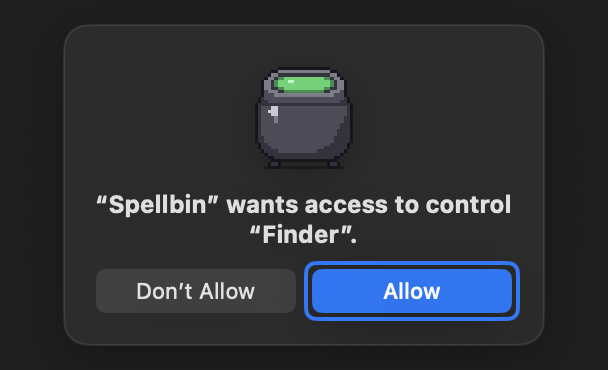
Finder Automation
Knowing what ⌘⌫ was aimed at
Spellbin asks Finder for the current selection when you press ⌘⌫. That is the only thing it ever asks Finder.
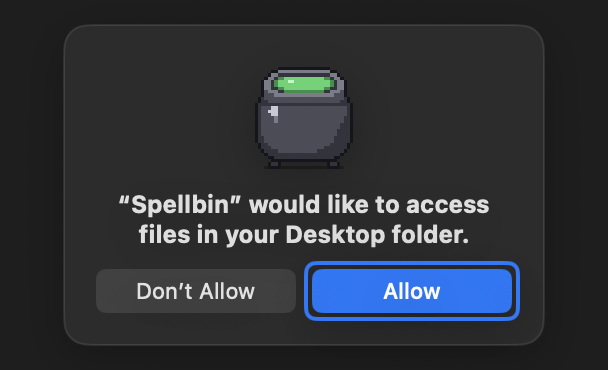
Files & Folders
Binning from Desktop, Documents and Downloads
macOS asks once per folder. Spellbin asks up front so a prompt never interrupts a delete. Files dropped on the Dock icon never need it.
The full story, including how to switch them off again: Permissions explained.
FAQ
Reasonable questions
Straight answers about what Spellbin does with your files, and what it does not.
Is Spellbin safe to use?
Yes. It is a native Mac app, signed with an Apple Developer ID and notarised by Apple. By default it moves files to the normal macOS Bin, exactly like pressing ⌘⌫ would. It makes no network calls.
Where do my files actually go?
In the default Send to Bin mode, straight into the real macOS Bin. If you switch to Dissolve forever mode, they are deleted outright instead, with a confirmation that is on by default.
Can I get a file back?
In Send to Bin mode, yes: open the Bin and use Put Back as usual. Files dissolved in Dissolve forever mode skip the Bin, so they are gone. That is rather the point of the mode.
Does it replace the macOS Bin?
No. macOS will not let anything replace or remove the Bin from the Dock, so Spellbin sits beside it as a second, more theatrical one.
Why is it not on the Mac App Store?
The App Store sandbox forbids the Accessibility API that lets the flame rise above the Dock. So Spellbin is a direct download instead, Developer ID signed and notarised.
Does it need any permissions?
Not to work. Dropping files on the Dock icon needs nothing. Accessibility lets the flame escape the Dock and lets ⌘⌫ work in Finder, and Finder Automation lets Spellbin see which files are selected. Both are optional and explained before macOS asks.
What does it cost?
Spellbin is not out yet. Pricing will be announced when it launches.
Does it run on Intel Macs?
Yes. Spellbin runs on Apple Silicon and Intel Macs with macOS 14 Sonoma or later.
Does it phone home?
No. Spellbin makes no network calls, has no analytics and no accounts. Your stats and achievements live on your Mac.
The pot is hungry.
Your Downloads folder will not empty itself, but it can at least go out in style.
Coming soon. macOS 14+, Apple Silicon and Intel.